Overview
FigJam is the digital whiteboard that makes team brainstorming sessions truly come alive, even remotely. Built by the creators of Figma, it is an intuitive, collaborative and rich space. Participants can add sticky notes, draw freehand, create diagrams or vote with emojis, stickers and real-time reactions.
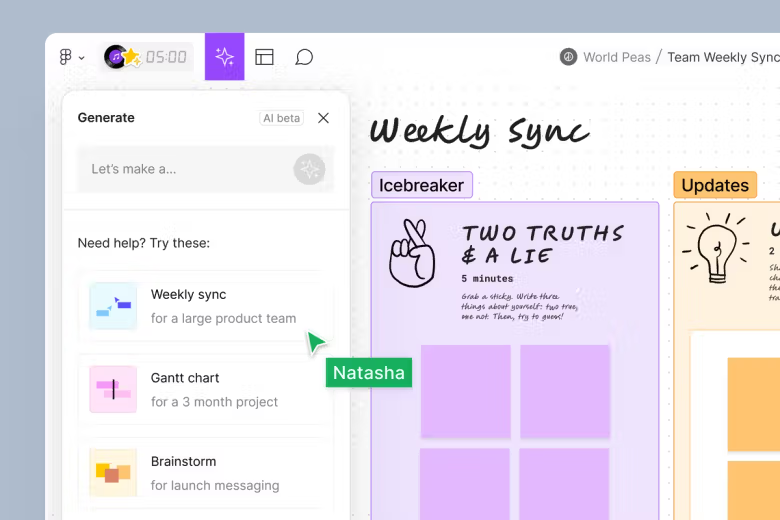
The tool also offers ready-to-use templates to kick off workshops (retrospective, stand-up, user journey map, etc.), with the option to generate a custom canvas with AI. Shapes, areas and styles are easy to manipulate, and import/export with Figma is instant, perfect for moving from brainstorming to detailed design without a break.
Pros
- Smooth visual creativity
A huge infinite canvas to write, draw, annotate and move ideas around like on a real board. - Dynamic real-time participation
Audio chat, visible cursors, animated reactions, votes and stickers all encourage engagement. - AI-assisted collaborative templates
Start your workshops with solid structures (mind map, flow, retro…), generated automatically or customizable. - Perfect integration with Figma
Drag your designs in from Figma to annotate or brainstorm on them without breaking your workflow. - Easy to invite and share
Share a link; contributors can join without an account for 24 hours, ideal for one-off workshops or external clients. - Multi-purpose
Workshops, user flows, sprint planning, moodboards, visual documentation… one space for every use. - Built-in creative AI
Structure generation, semantic sorting of sticky notes and automatic summaries; the AI saves time.
Cons
- Perceived as a separate tool
Although part of the Figma ecosystem, it remains a distinct tool, which some find less fluid across a project. - Not ideal for precision design
The tool is excellent for ideation but doesn’t replace Figma for final UI design. - Rich interface for newcomers
The many options (stickers, templates, AI) are quick to learn but can feel a bit dense.
Why Studio Elias uses FigJam
At Studio Elias, FigJam is at the heart of our collective creativity:
- It supports our workshops, planning sessions and client briefs in a simple, engaging visual format.
- It lets us move seamlessly from the idea box to concrete design in Figma.
- Its AI makes it easy to generate canvases automatically or organize brainstorming content.
- It helps get clients on board thanks to a shared, interactive interface with no technical friction.
FigJam is a visual catalyst for collaboration: agile, inclusive and ultra-effective.