Elias, Branding Studio, webflow partner

Tutorial: Learn Figma in 5 steps

Your brand, our focus
Branding
resources
/
Branding
/
Tutorial: Learn Figma in 5 steps
March 2023
5
Min

The best Hack to train in Figma ? Get information from the right resources and practice a lot!

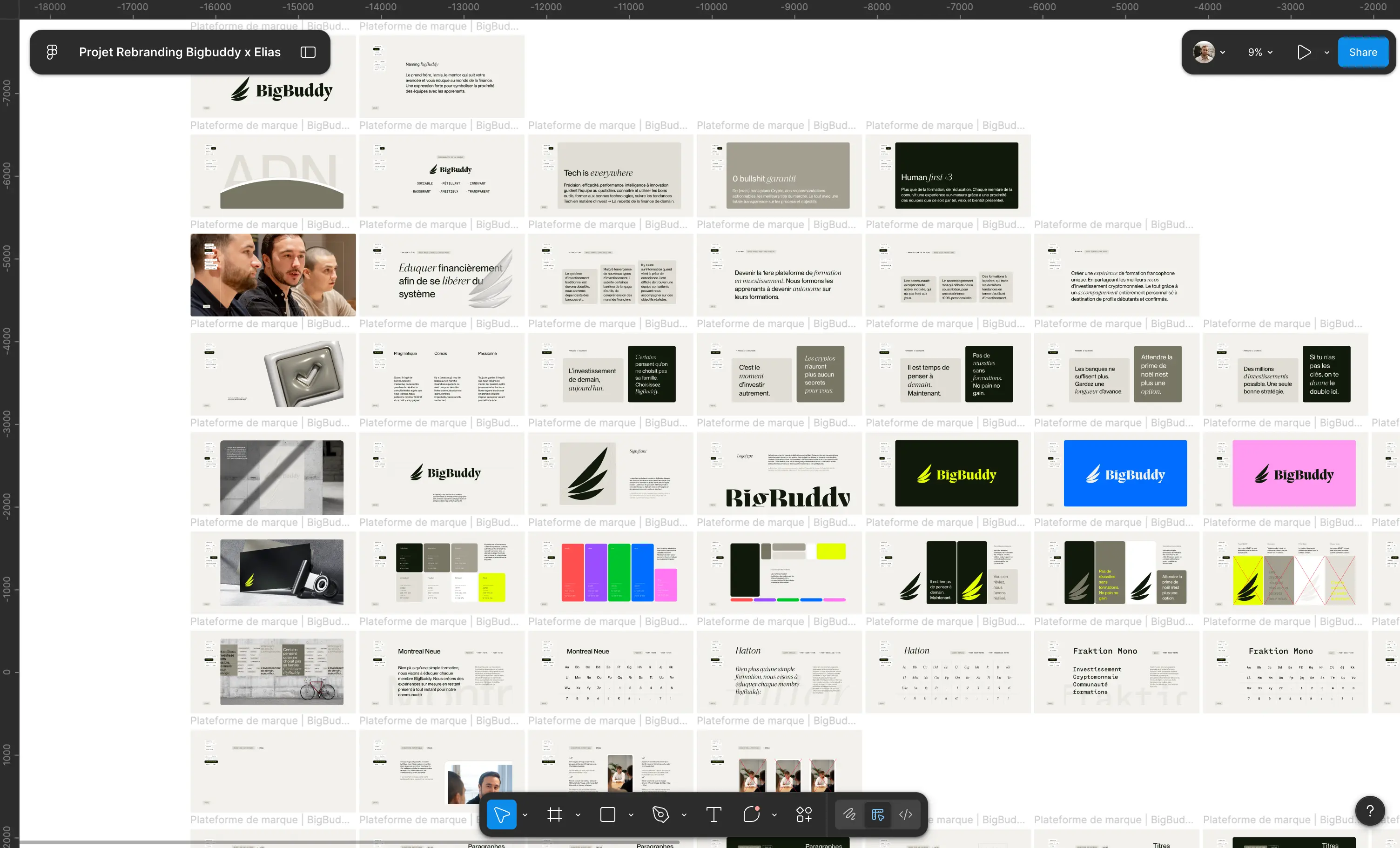
In this article, I am giving you the keys to training yourself in Figma. You know, Figma, this design software Ofui that allows create mockups interactive, of prototypes and designs graphs for all digital media 😉

As designer, it is essential to master this tool!

So here are the 5 steps to follow to To be formed at Figma 👇

1. Understand the basics of Figma and its functionalities

The first step is to Learn the basics by Figma 😄

To do this, you can start by following tutorials online about key Figma features, such as creating and importing Mockups, the implementation of a project, the management of graphic elements, the creation of web pages and in collaboration with developers or any other party involved in the project. YouTube is your best friend! We recommend you the Cocatoès Academy channel, a gem 😍

Also, to help you in this quest Figma provides numerous online resources. To start, Figma offers you 12 free lessons to learn the basics of design as well as a series of practical exercises to perform on the tool. In an hour and a half, your web design education will be strengthened! And the practical implementation will make you familiar with the Get started with Figma.

If you are interested in this program, I will give you an appointment right here ✌🏼

To go further, I recommend you these guides, you will find the best practices for carrying out actions on Figma.

2. Learn to create interfaces ergonomic and responsive

Once you've mastered the basics of Figma, you can focus on creatinginterfaces ergonomic and Responsive. To do this, you must Learn to design Of the elements visuals that adapt to various supports digital, smartphones, tablets, computers...

Again, do not hesitate to ask for information from the resources made available by Figma, by the community itself, or via the documentation that you will find all over the web (YouTube in the lead 🤓)

You will also need to understand the principles ofergonomics in order to offer interfaces friendly and functional for users.

💡 A few tips for the road:

  • Know the user needs : it is essential to understand the needs and expectations of users in order to offer an interface that meets their needs!
  • Simplify the interface: an interface that is too complex can discourage users and prevent them from using the application.
  • Use interface conventions : Users are used to interface conventions such as buttons, icons, and dropdown menus. It is recommended that you use these conventions to make the interface more familiar and easy to use. We think design ✨
  • Use a Typography and consistent colors : consistent typography and colors contribute to making the interface more aesthetic and easy to understand.
  • Tester the interface: User feedback can be used to improve the interface and make it more user-friendly and functional 🚀

3. Practice by creating your own projects

Then it's simple: practice, practice, practice!

For Mastering Figma and becoming an experienced designer, no secret. You need to create your own projects, build a portfolio, and train yourself continuously. You need to maintain a Technology watch regularly to keep you up to date with latest trends And new features of the tool 🤞 Because everything moves very quickly!

To be trained at Figma requires a good dose of practice, patience, and persistence.

But don't worry, you are not alone!

4. Join online groups or forums to connect with other users

La Figma community Open your arms! 🙌 Do you have a question? A difficulty? A problem? Are you looking for inspiration? Designs? Templates? The community is here to help you 😍

You will be surprised at theMutual aid and the wealth of information that can be found on these groups that are constantly growing! If you want to make continuous progress, talk to other users who are more competent than you (for the moment 😉).

Go directly to the Community tab on Figma. There are even virtual events for Figma users and fans !

It's not a joke

5. Acquire technical skills in graphic design

To become a designer unparalleled (👀), it is important to acquire technical skills in graphic design, if only to understand the developers with whom you will collaborate in future projects. To do this, you can take online courses on different languages programming such as HTML, CSS, jQuery and MYSQL. You can also learn how to use software such as Photoshop and Illustrator for the creation ofgraphic elements (That's if you want to learn how to use other tools 🤪).

Bonus: How to design your Webflow site on Figma

All that's left is to wish you a great education!

Before going to dive into the documentation, I suggest you continue your Figma exploration: learn how to design your Webflow site on Figma! 🤩

Elias, Branding Studio, webflow partner

Brand Strategy
Brand Identity
Brand Experience
Naming
Copywriting
Brand Idea
Logo
Photography
Illustration
3D & Motion
SEO
Website
Webflow
Custom Animation
Maintenance
Webdesgin

We are brand creators. We transform projects into a strong, online brand.

It's time to turn your project into a brand

Brand Strategy
Brand Identity
Brand Experience
Brand Strategy
Brand Identity
Brand Experience

Tutorial: Learn Figma in 5 steps

Ressources
/
Branding
/
Tutorial: Learn Figma in 5 steps
Mise à jour le
28/11/2025
Auteur
Axel
Expert Brand & Web @ Elias
0
1
2
3
4
5
6
7
8
9
0
1
2
3
4
5
6
7
8
9
%

L'essentiel à retenir

Se former à Figma, c’est bien plus que “apprendre un logiciel” : c’est adopter une méthode structurée qui allie bases techniques, pratique, communauté et compétences complémentaires. Voici donc les 5 étapes essentielles à suivre :

  • Apprendre les fondations de Figma : familiarisez-vous avec l’interface, les fonctionnalités de base, la gestion des fichiers et la collaboration.
  • Concevoir des interfaces ergonomiques et responsives : adaptez-vous aux supports (mobile, tablette, desktop), respectez les conventions de design et simplifiez l’expérience utilisateur.
  • Créer vos propres projets : pratiquez ! Construisez des maquettes, prototypes ou mini-sites pour affiner votre logique, tester vos choix et enrichir votre portfolio.
  • Participer à une communauté : échangez, demandez des retours, utilisez des templates partagés. La communauté permet de gagner du temps et de progresser plus vite.
  • Acquérir des compétences graphiques et techniques associées : maîtrisez la typographie, les couleurs, la grille, et familiarisez-vous avec HTML/CSS ou d’autres logiciels si vous voulez collaborer efficacement avec des devs ou aller plus loin.

Suivre ces 5 étapes vous donne un cadre clair pour passer de débutant à utilisateur compétent de Figma. Pensez méthode + pratique + échange.

The best Hack to train in Figma ? Get information from the right resources and practice a lot!

In this article, I am giving you the keys to training yourself in Figma. You know, Figma, this design software Ofui that allows create mockups interactive, of prototypes and designs graphs for all digital media 😉

As designer, it is essential to master this tool!

So here are the 5 steps to follow to To be formed at Figma 👇

1. Understand the basics of Figma and its functionalities

The first step is to Learn the basics by Figma 😄

To do this, you can start by following tutorials online about key Figma features, such as creating and importing Mockups, the implementation of a project, the management of graphic elements, the creation of web pages and in collaboration with developers or any other party involved in the project. YouTube is your best friend! We recommend you the Cocatoès Academy channel, a gem 😍

Also, to help you in this quest Figma provides numerous online resources. To start, Figma offers you 12 free lessons to learn the basics of design as well as a series of practical exercises to perform on the tool. In an hour and a half, your web design education will be strengthened! And the practical implementation will make you familiar with the Get started with Figma.

If you are interested in this program, I will give you an appointment right here ✌🏼

To go further, I recommend you these guides, you will find the best practices for carrying out actions on Figma.

2. Learn to create interfaces ergonomic and responsive

Once you've mastered the basics of Figma, you can focus on creatinginterfaces ergonomic and Responsive. To do this, you must Learn to design Of the elements visuals that adapt to various supports digital, smartphones, tablets, computers...

Again, do not hesitate to ask for information from the resources made available by Figma, by the community itself, or via the documentation that you will find all over the web (YouTube in the lead 🤓)

You will also need to understand the principles ofergonomics in order to offer interfaces friendly and functional for users.

💡 A few tips for the road:

  • Know the user needs : it is essential to understand the needs and expectations of users in order to offer an interface that meets their needs!
  • Simplify the interface: an interface that is too complex can discourage users and prevent them from using the application.
  • Use interface conventions : Users are used to interface conventions such as buttons, icons, and dropdown menus. It is recommended that you use these conventions to make the interface more familiar and easy to use. We think design ✨
  • Use a Typography and consistent colors : consistent typography and colors contribute to making the interface more aesthetic and easy to understand.
  • Tester the interface: User feedback can be used to improve the interface and make it more user-friendly and functional 🚀

3. Practice by creating your own projects

Then it's simple: practice, practice, practice!

For Mastering Figma and becoming an experienced designer, no secret. You need to create your own projects, build a portfolio, and train yourself continuously. You need to maintain a Technology watch regularly to keep you up to date with latest trends And new features of the tool 🤞 Because everything moves very quickly!

To be trained at Figma requires a good dose of practice, patience, and persistence.

But don't worry, you are not alone!

4. Join online groups or forums to connect with other users

La Figma community Open your arms! 🙌 Do you have a question? A difficulty? A problem? Are you looking for inspiration? Designs? Templates? The community is here to help you 😍

You will be surprised at theMutual aid and the wealth of information that can be found on these groups that are constantly growing! If you want to make continuous progress, talk to other users who are more competent than you (for the moment 😉).

Go directly to the Community tab on Figma. There are even virtual events for Figma users and fans !

It's not a joke

5. Acquire technical skills in graphic design

To become a designer unparalleled (👀), it is important to acquire technical skills in graphic design, if only to understand the developers with whom you will collaborate in future projects. To do this, you can take online courses on different languages programming such as HTML, CSS, jQuery and MYSQL. You can also learn how to use software such as Photoshop and Illustrator for the creation ofgraphic elements (That's if you want to learn how to use other tools 🤪).

Bonus: How to design your Webflow site on Figma

All that's left is to wish you a great education!

Before going to dive into the documentation, I suggest you continue your Figma exploration: learn how to design your Webflow site on Figma! 🤩

Vous êtes bien inscrits.
Souscrire à la newsletter
Oops! Something went wrong while submitting the form.
Stratégie
Identité
Web
Stratégie
Identité
Web
Stratégie
Identité
Web

It's time to turn your project into a brand

Brand Strategy
Brand Identity
Brand Experience
Brand Strategy
Brand Identity
Brand Experience