
Elias, Branding Studio, webflow partner

Figma for your web design: your best ally

Your brand, our focus
Webflow
resources
/
Webflow
/
Figma for your web design: your best ally
21/03/2025
8
Min

Creating a website without a mockup is a bit like building a house without blueprints: a perfect recipe for disaster. (Spoiler alert: it rarely ends well.) Fortunately, Figma is here to save your design from chaos!

Whether you're a designer, developer, or simply someone who wants their website to have more style than a 2000s PowerPoint, Figma is the tool for you. Accessible, intuitive, and ultra-powerful, it allows you to design modern interfaces, collaborate in real-time, and even prepare your site for seamless integration on Webflow, for example.

Curious to see everything Webflow can do once your mockup is ready? Our article on why develop your showcase website with Webflow in 2025 answers everything.

And because we know you don't want to get bogged down in a 50-page tutorial, we've prepared a simple and effective guide for you to master Figma and create stunning mockups. So, buckle up, we're taking you on a ride! 🚀

Why Figma is your best friend in 2025?

A true design gem

If it were a rockstar, it would fill stadiums with every update. This tool is a favorite among designers and agencies (including ours, of course) for a simple reason: it's accessible everywhere, ultra-flexible, and super intuitive. Whether you're on a Mac, PC, or even a tablet, everything happens directly in your browser. No need to download heavy software; you just open Figma and create.

But that's not all. Thanks to reusable components, global styles, and seamless integration with other tools, it allows you to structure each section of a design with clarity. No more Figma mockups scattered like jigsaw puzzle pieces; Figma offers a clear process and facilitates the organization of data and content.

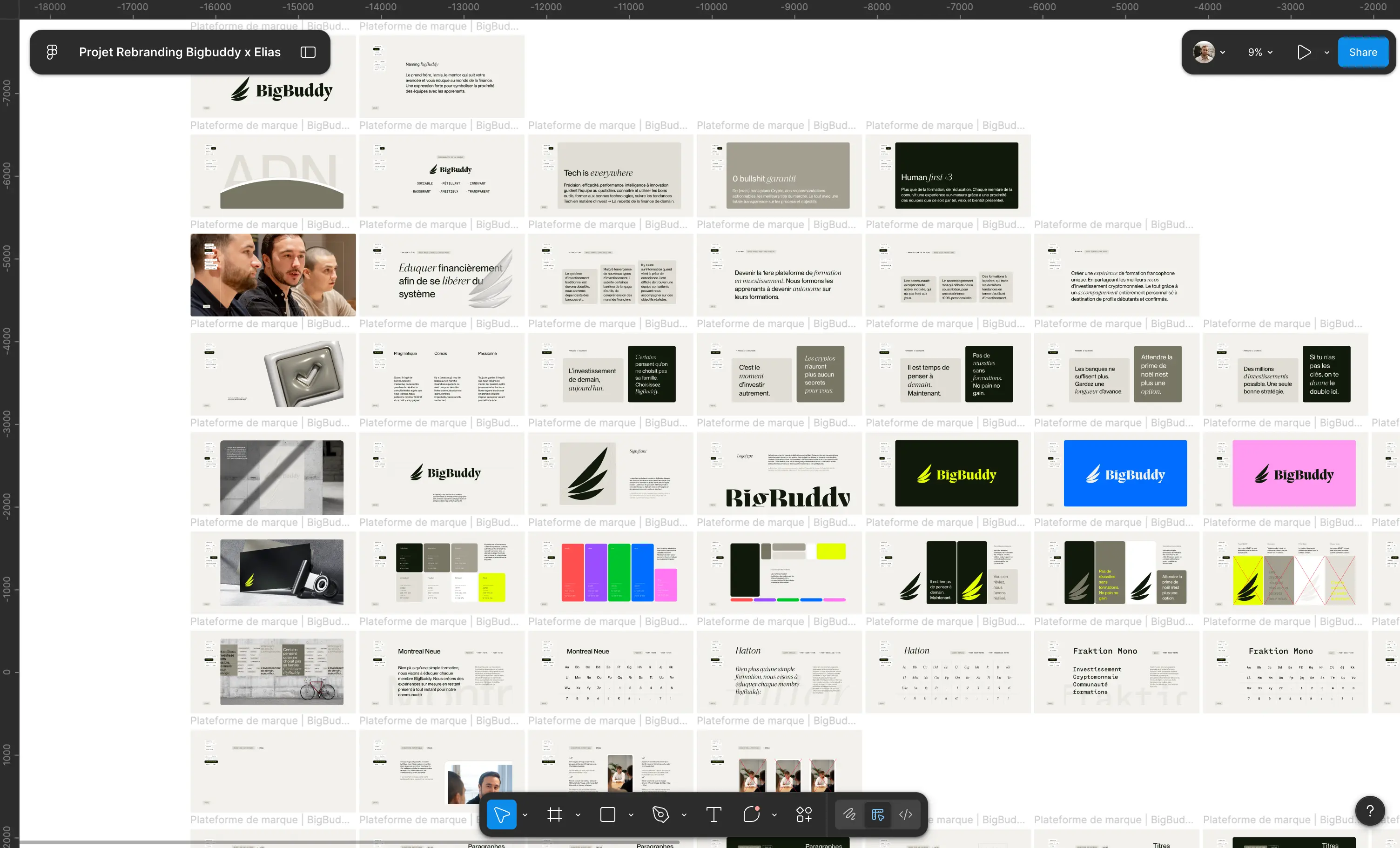
Mockup made on Figma for our client Pipole

{{cta-1}}

Collaboration as smooth as butter 🧈

Do you remember the time when you had to send a file "maquette-final-v2-def-der-final.psd" by email, hoping no one would touch it before validation? Forget about it.

With Figma, everyone can edit and use a design in real-time, all within a single file.

  • Does a developer need data and specifications? They can extract them in just a few clicks.
  • Does a colleague want to adjust a section or text? They can do it directly within the Figma mockup.
  • Does a client want to provide feedback? They can comment online, without losing information or endless back-and-forths.

No more managing ten different versions of the same project: everything is centralized, fluid, and efficient.

To go further: Why Figma remains the #1 web design tool in 2025?

{{block-cta-1}}

In summary: Figma allows you to create, organize, and test your ideas without wasting time. And believe us, in 2025, nobody wants to deal with a rigid and difficult-to-modify design!

Figma, user guide: from idea to interactive prototype

The Figma interface in 2 minutes flat

No need to be an expert, Figma offers a simple yet powerful interface. Here are the essentials to understand:

  • Frames: Your artboards, adapted for each screen (desktop, mobile...).
  • Components: Need to duplicate a button? Turn it into a reusable element and modify it everywhere with a single click.
  • Global Styles: Typography, colors, spacing… One change, a global update. A design system , when well-used, allows you to create your best Figma project.

Figma is your design conductor : everything remains organized, clear, and easy to modify.

Figma Interface

Grids and guides, or nothing!

A poorly aligned design makes for a shaky website. Using Figma's smart grids and guides ensures:

Perfect alignment

Responsive design

Harmonious layout

Quick tip: Never neglect guides, they save your design from approximations and provide a solid structure for every project.

Components and variants: the magic of systematized design

No more tedious updates! With these tools, a change to one element is reflected everywhere.

  • Create a single button with multiple states: normal, hover, active.
  • Simplified management for a consistent and flexible design. This design consistency is formalized in a style guide, and Figma is precisely the ideal tool to implement it. Discover our guide on style guides.

Figma optimizes your workflow, makes life easier for designers and developers, and offers a seamless workflow experience. Embraced, validated. 🚀

Figma Components

Creating a Stunning Figma Mockup

Because while having a beautiful website is good, having one that's beautiful, functional, and optimized is even better. Figma allows you to structure your design in a clear and impactful way. Say goodbye to vague mockups and clunky user experiences; it's time to get serious.

Designing an Impactful UI

Good design is like a good pizza: a solid base, consistency, and well-chosen ingredients. Here are the three elements that will make all the difference in your mockup:

  • Typography: No more than two fonts (otherwise it's chaos). One for headings, one for body text. The key? Readability, contrast, and hierarchy. The choice of fonts and colors is a strategic decision. Our guide to choosing your color palette explains how to build a consistent system.
  • A well-thought-out palette is essential for consistent design. For a harmonious result, apply this simple rule: 60% for the dominant color, 30% for the secondary, and 10% for the accent. This ratio ensures visual balance and clear hierarchy without overwhelming the eye. It's the very foundation of a visual identity that's strong: graphic choices considered holistically, not just accumulated as the project progresses.
  • Visual hierarchy: Large headings, clearly distinct subheadings, important elements highlighted. A user should understand the information at a glance.

A poorly designed website is like a Christmas sweater in summer. You notice it, but not for the right reasons.

User experience: think like a user, not a designer

The classic designer trap: creating a beautiful site… that's unusable. If users struggle, they leave.

To avoid this, here are some basic principles:

  • Smooth navigation: A user should instinctively understand where to click. This navigation clarity begins with a brand strategy that's clear: when you know what you want to say and to whom, the design flows naturally.
  • Visible interactive elements: A button should look like a button, not just part of the scenery.
  • Optimized loading time: An overly heavy design slows everything down. Lightening images is the ABCs.

In short: beautiful AND practical, that's the winning combination.

To put these principles into practice directly in Webflow, discover our 8 Webflow elements to improve your site's user experience.

Responsive Design: From XXL Screen to Smartphone

Your design needs to work everywhere. Because a poorly adapted site looks "cut in half" on mobile... and nobody wants that.

A few rules to avoid disaster:

  • Use flexible grids: Your elements should adapt without breaking when the screen shrinks.
  • Test different formats: Desktop, tablet, mobile... Figma allows you to preview the display on every screen.
  • Keep buttons accessible: A button that's too small on mobile is a guaranteed frustration.

A good website adapts to its user, not the other way around. With these fundamentals, your design will not only be effective but also a pleasure to navigate.
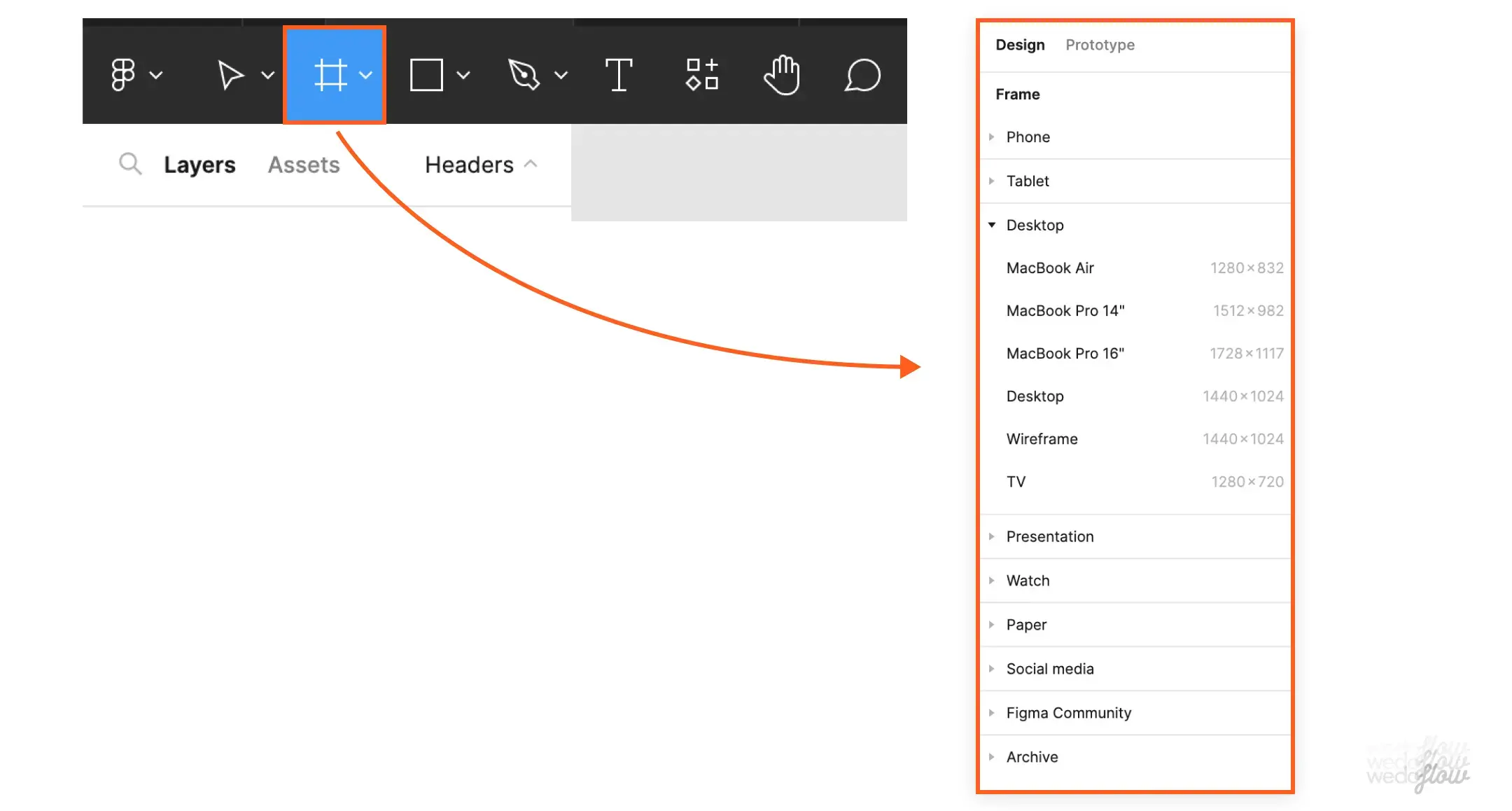
Different Figma formats

From Figma to Webflow: The Winning Duo

Figma is great for creating a flawless mockup. But once your design is ready, how do you turn it into a functional website without breaking everything? That's where Webflow comes in. With these two tools, you can go from concept to live site without sacrificing quality or efficiency.

Importing Your Design into Webflow

Creating a beautiful mockup is one thing. Converting it into a well-coded website is another. Fortunately, Webflow makes the transition easier, provided you're well-organized. Here are the essential steps:

  1. Prepare your file: First and foremost, ensure everything is well-structured. Clear layer names, well-defined styles... A clean file equals seamless integration.
  2. Export your assets: Logos, icons, images... Webflow supports several formats (SVG, PNG, JPEG), so optimize your files for a perfect display.
  3. Building your Webflow structure according to the design: Use CSS grids and flexbox to accurately replicate your design.
  4. Adding styles and interactions: Webflow allows you to apply the same colors, fonts, and effects as those defined in Figma, without having to manually redo everything.
  5. Testing and adjusting: Before publishing, check the display on desktop, tablet, and mobile. Good responsive design doesn't happen by chance.

If everything is done correctly, your final site will be true to your design, while remaining fluid and high-performing. And when the site reflects a brand platform that is well-defined, it doesn't just appear consistent, it is.

Want to see what that looks like in practice? Here's how to convert your Figma web design to Webflow step by step.
Figma design for our client Fuga's Webflow website

Optimizing your Webflow with Figma

A good Figma file makes for a hassle-free Webflow experience. To avoid unpleasant surprises during integration, here are some best practices:

  • Maintain a logical hierarchy: Use frames to structure your sections (header, footer, content) and keep names clear.
  • Use reusable components: If you have the same button everywhere, create a component in Figma so Webflow can easily replicate it with its own "Symbols".
  • Think about animations: If your design includes interactions, note them clearly for a smooth integration. Webflow can recreate almost all Figma animations.
  • Adopt a modular design: Fewer unnecessary variations = a lighter and easier-to-manage site.

📌 To learn more: The ultimate Webflow guide in 2025

By following these tips, you avoid wasting time and unpleasant surprises, and you create a site that respects your initial vision while being high-performing. Figma and Webflow are two tools made to work together, so you might as well make the most of them.

{{cta-2}}

Figma and Web Design trends to watch in 2025

Minimalism or maximalism?

Minimalism remains a reliable choice with clean and elegant interfaces. But maximalism is gaining ground with bold colors and dynamic compositions. To be chosen according to thebrand image and the target audience.

Animations and micro-interactions

Details matter: responsive buttons, smooth transitions, immersive scroll effects. Figma allows you to test these interactions before Webflow integration, without burdening the user experience.

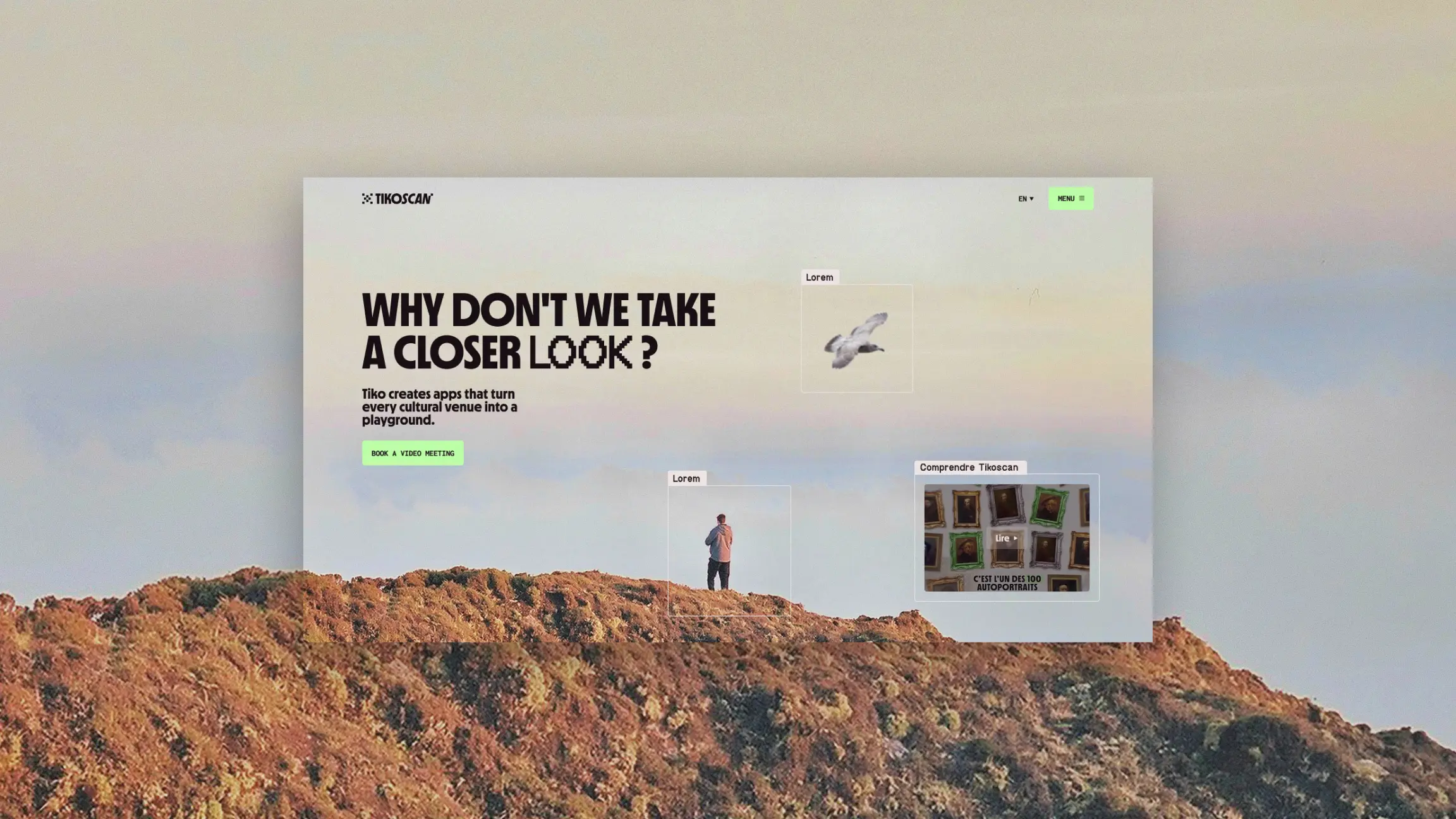
Hero section preview for our client Shiperise

{{block-cta-2}}

Dark mode and accessibility

Dark mode has become a standard, and accessibility is a priority. High contrasts, intuitive navigation, readability… Good design adapts to all users.

Light mode vs. Dark mode - Figma

📌 To go further: The 20 web design trends that will revolutionize 2025

Figma is the perfect tool to anticipate these trends and design cutting-edge websites.

{{cta-3}}

Figma, the essential tool for top-notch web design

Whether you're a designer or a developer, Figma is your best ally for creating clear, interactive, and perfectly web-adapted mockups. Thanks to its intuitive interface, reusable components, and seamless integration with Webflow, it simplifies every step of the process, from the first digital sketch to going live.

In 2025, web design is evolving rapidly: minimalism or maximalism, immersive animations, enhanced accessibility… With Figma, you can test, adjust, and always stay at the forefront of trends.

So, ready to design stunning websites? Open Figma, unleash your creativity, and bring memorable web experiences to life!

Elias, Branding Studio, webflow partner

Brand Strategy
Brand Identity
Brand Experience
Naming
Copywriting
Brand Idea
Logo
Photography
Illustration
3D & Motion
SEO
Website
Webflow
Custom Animation
Maintenance
Webdesgin

We are brand creators. We transform projects into a strong, online brand.

Your website: your new superpower

Brand Strategy
Brand Identity
Brand Experience
Brand Strategy
Brand Identity
Brand Experience

Figma for your web design: your best ally

Ressources
/
Webflow
/
Figma for your web design: your best ally
Updated on
23/5/2026
Auteur
Clément
Expert Brand & Web @ Elias
0
1
2
3
4
5
6
7
8
9
0
1
2
3
4
5
6
7
8
9
%

The main thing to remember

Figma has established itself as an essential tool for modern web design, thanks to its ability to combine collaboration, speed, and quality. This article highlights why it has become a reliable ally for designers and digital teams.

  • Figma enables real-time collaborative creation : multiple members can work simultaneously on a file, exchange comments, and iterate quickly.
  • The tool is tailored for web design: mockups, interactive prototypes, design systems, responsive layouts – everything is designed for the digital context.
  • It integrates seamlessly with current workflows: file imports, plugins, sharing, remote work, which reduces friction and speeds up production.
  • Thanks to reusable components, shared grids, and centralized libraries, visual consistency is enhanced and maintenance is streamlined.
  • It suits freelancers as well as agency or in-house teams: easy access, browser compatibility, and a free or affordable version to get started.

Choosing Figma isn't just adopting a tool; it's embracing a design methodology that is more fluid, collaborative, and user-experience-focused.

Creating a website without a mockup is a bit like building a house without blueprints: a perfect recipe for disaster. (Spoiler alert: it rarely ends well.) Fortunately, Figma is here to save your design from chaos!

Whether you're a designer, developer, or simply someone who wants their website to have more style than a 2000s PowerPoint, Figma is the tool for you. Accessible, intuitive, and ultra-powerful, it allows you to design modern interfaces, collaborate in real-time, and even prepare your site for seamless integration on Webflow, for example.

Curious to see everything Webflow can do once your mockup is ready? Our article on why develop your showcase website with Webflow in 2025 answers everything.

And because we know you don't want to get bogged down in a 50-page tutorial, we've prepared a simple and effective guide for you to master Figma and create stunning mockups. So, buckle up, we're taking you on a ride! 🚀

Why Figma is your best friend in 2025?

A true design gem

If it were a rockstar, it would fill stadiums with every update. This tool is a favorite among designers and agencies (including ours, of course) for a simple reason: it's accessible everywhere, ultra-flexible, and super intuitive. Whether you're on a Mac, PC, or even a tablet, everything happens directly in your browser. No need to download heavy software; you just open Figma and create.

But that's not all. Thanks to reusable components, global styles, and seamless integration with other tools, it allows you to structure each section of a design with clarity. No more Figma mockups scattered like jigsaw puzzle pieces; Figma offers a clear process and facilitates the organization of data and content.

Mockup made on Figma for our client Pipole

{{cta-1}}

Collaboration as smooth as butter 🧈

Do you remember the time when you had to send a file "maquette-final-v2-def-der-final.psd" by email, hoping no one would touch it before validation? Forget about it.

With Figma, everyone can edit and use a design in real-time, all within a single file.

  • Does a developer need data and specifications? They can extract them in just a few clicks.
  • Does a colleague want to adjust a section or text? They can do it directly within the Figma mockup.
  • Does a client want to provide feedback? They can comment online, without losing information or endless back-and-forths.

No more managing ten different versions of the same project: everything is centralized, fluid, and efficient.

To go further: Why Figma remains the #1 web design tool in 2025?

{{block-cta-1}}

In summary: Figma allows you to create, organize, and test your ideas without wasting time. And believe us, in 2025, nobody wants to deal with a rigid and difficult-to-modify design!

Figma, user guide: from idea to interactive prototype

The Figma interface in 2 minutes flat

No need to be an expert, Figma offers a simple yet powerful interface. Here are the essentials to understand:

  • Frames: Your artboards, adapted for each screen (desktop, mobile...).
  • Components: Need to duplicate a button? Turn it into a reusable element and modify it everywhere with a single click.
  • Global Styles: Typography, colors, spacing… One change, a global update. A design system , when well-used, allows you to create your best Figma project.

Figma is your design conductor : everything remains organized, clear, and easy to modify.

Figma Interface

Grids and guides, or nothing!

A poorly aligned design makes for a shaky website. Using Figma's smart grids and guides ensures:

Perfect alignment

Responsive design

Harmonious layout

Quick tip: Never neglect guides, they save your design from approximations and provide a solid structure for every project.

Components and variants: the magic of systematized design

No more tedious updates! With these tools, a change to one element is reflected everywhere.

  • Create a single button with multiple states: normal, hover, active.
  • Simplified management for a consistent and flexible design. This design consistency is formalized in a style guide, and Figma is precisely the ideal tool to implement it. Discover our guide on style guides.

Figma optimizes your workflow, makes life easier for designers and developers, and offers a seamless workflow experience. Embraced, validated. 🚀

Figma Components

Creating a Stunning Figma Mockup

Because while having a beautiful website is good, having one that's beautiful, functional, and optimized is even better. Figma allows you to structure your design in a clear and impactful way. Say goodbye to vague mockups and clunky user experiences; it's time to get serious.

Designing an Impactful UI

Good design is like a good pizza: a solid base, consistency, and well-chosen ingredients. Here are the three elements that will make all the difference in your mockup:

  • Typography: No more than two fonts (otherwise it's chaos). One for headings, one for body text. The key? Readability, contrast, and hierarchy. The choice of fonts and colors is a strategic decision. Our guide to choosing your color palette explains how to build a consistent system.
  • A well-thought-out palette is essential for consistent design. For a harmonious result, apply this simple rule: 60% for the dominant color, 30% for the secondary, and 10% for the accent. This ratio ensures visual balance and clear hierarchy without overwhelming the eye. It's the very foundation of a visual identity that's strong: graphic choices considered holistically, not just accumulated as the project progresses.
  • Visual hierarchy: Large headings, clearly distinct subheadings, important elements highlighted. A user should understand the information at a glance.

A poorly designed website is like a Christmas sweater in summer. You notice it, but not for the right reasons.

User experience: think like a user, not a designer

The classic designer trap: creating a beautiful site… that's unusable. If users struggle, they leave.

To avoid this, here are some basic principles:

  • Smooth navigation: A user should instinctively understand where to click. This navigation clarity begins with a brand strategy that's clear: when you know what you want to say and to whom, the design flows naturally.
  • Visible interactive elements: A button should look like a button, not just part of the scenery.
  • Optimized loading time: An overly heavy design slows everything down. Lightening images is the ABCs.

In short: beautiful AND practical, that's the winning combination.

To put these principles into practice directly in Webflow, discover our 8 Webflow elements to improve your site's user experience.

Responsive Design: From XXL Screen to Smartphone

Your design needs to work everywhere. Because a poorly adapted site looks "cut in half" on mobile... and nobody wants that.

A few rules to avoid disaster:

  • Use flexible grids: Your elements should adapt without breaking when the screen shrinks.
  • Test different formats: Desktop, tablet, mobile... Figma allows you to preview the display on every screen.
  • Keep buttons accessible: A button that's too small on mobile is a guaranteed frustration.

A good website adapts to its user, not the other way around. With these fundamentals, your design will not only be effective but also a pleasure to navigate.

Different Figma formats

From Figma to Webflow: The Winning Duo

Figma is great for creating a flawless mockup. But once your design is ready, how do you turn it into a functional website without breaking everything? That's where Webflow comes in. With these two tools, you can go from concept to live site without sacrificing quality or efficiency.

Importing Your Design into Webflow

Creating a beautiful mockup is one thing. Converting it into a well-coded website is another. Fortunately, Webflow makes the transition easier, provided you're well-organized. Here are the essential steps:

  1. Prepare your file: First and foremost, ensure everything is well-structured. Clear layer names, well-defined styles... A clean file equals seamless integration.
  2. Export your assets: Logos, icons, images... Webflow supports several formats (SVG, PNG, JPEG), so optimize your files for a perfect display.
  3. Building your Webflow structure according to the design: Use CSS grids and flexbox to accurately replicate your design.
  4. Adding styles and interactions: Webflow allows you to apply the same colors, fonts, and effects as those defined in Figma, without having to manually redo everything.
  5. Testing and adjusting: Before publishing, check the display on desktop, tablet, and mobile. Good responsive design doesn't happen by chance.

If everything is done correctly, your final site will be true to your design, while remaining fluid and high-performing. And when the site reflects a brand platform that is well-defined, it doesn't just appear consistent, it is.

Want to see what that looks like in practice? Here's how to convert your Figma web design to Webflow step by step.
Figma design for our client Fuga's Webflow website

Optimizing your Webflow with Figma

A good Figma file makes for a hassle-free Webflow experience. To avoid unpleasant surprises during integration, here are some best practices:

  • Maintain a logical hierarchy: Use frames to structure your sections (header, footer, content) and keep names clear.
  • Use reusable components: If you have the same button everywhere, create a component in Figma so Webflow can easily replicate it with its own "Symbols".
  • Think about animations: If your design includes interactions, note them clearly for a smooth integration. Webflow can recreate almost all Figma animations.
  • Adopt a modular design: Fewer unnecessary variations = a lighter and easier-to-manage site.

📌 To learn more: The ultimate Webflow guide in 2025

By following these tips, you avoid wasting time and unpleasant surprises, and you create a site that respects your initial vision while being high-performing. Figma and Webflow are two tools made to work together, so you might as well make the most of them.

{{cta-2}}

Figma and Web Design trends to watch in 2025

Minimalism or maximalism?

Minimalism remains a reliable choice with clean and elegant interfaces. But maximalism is gaining ground with bold colors and dynamic compositions. To be chosen according to thebrand image and the target audience.

Animations and micro-interactions

Details matter: responsive buttons, smooth transitions, immersive scroll effects. Figma allows you to test these interactions before Webflow integration, without burdening the user experience.

Hero section preview for our client Shiperise

{{block-cta-2}}

Dark mode and accessibility

Dark mode has become a standard, and accessibility is a priority. High contrasts, intuitive navigation, readability… Good design adapts to all users.

Light mode vs. Dark mode - Figma

📌 To go further: The 20 web design trends that will revolutionize 2025

Figma is the perfect tool to anticipate these trends and design cutting-edge websites.

{{cta-3}}

Figma, the essential tool for top-notch web design

Whether you're a designer or a developer, Figma is your best ally for creating clear, interactive, and perfectly web-adapted mockups. Thanks to its intuitive interface, reusable components, and seamless integration with Webflow, it simplifies every step of the process, from the first digital sketch to going live.

In 2025, web design is evolving rapidly: minimalism or maximalism, immersive animations, enhanced accessibility… With Figma, you can test, adjust, and always stay at the forefront of trends.

So, ready to design stunning websites? Open Figma, unleash your creativity, and bring memorable web experiences to life!

Un projet en tête ?

Prenez un moment pour échanger avec nos équipes

Booker un call
Stratégie
Identité
Web
Stratégie
Identité
Web
Stratégie
Identité
Web

Your website: your new superpower

Brand Strategy
Brand Identity
Brand Experience
Brand Strategy
Brand Identity
Brand Experience