Overview
Final Cut Pro is an editing solution built for video creators who demand speed, precision and innovation. On a Mac, especially one with a recent chip, it takes full advantage of modern architectures to handle multiple 4K-or-higher streams, deliver brilliant HDR output and run complex workflows without lag.
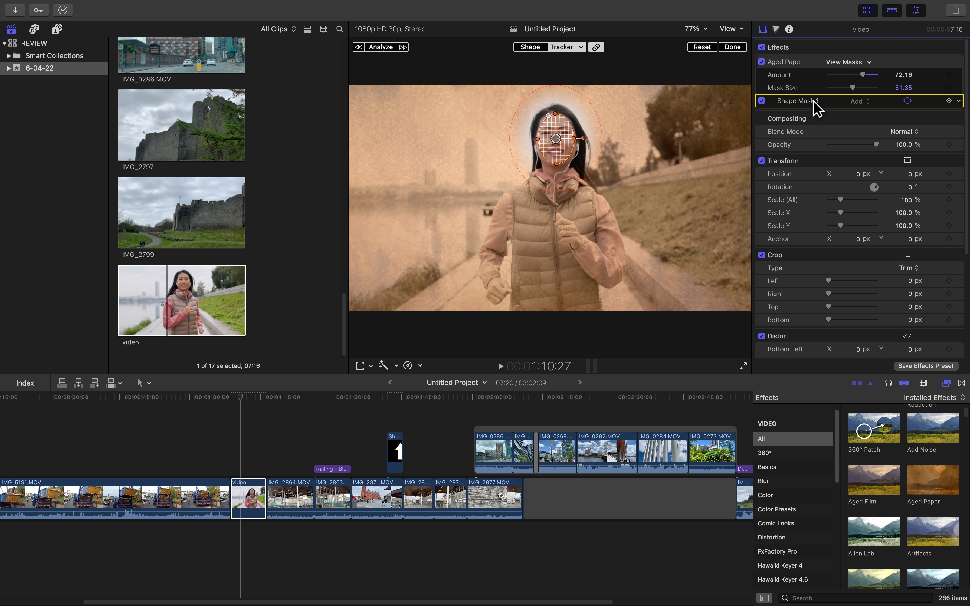
Its tools now include smart features: AI object detection, automatic caption generation, adaptive masks (Magnetic Mask) and rich metadata to structure projects. It is built for demanding edits (multicam, 360° video, visual effects, refined transitions, pro color grading and professional export) while staying intuitive for anyone who already knows the basics of editing.
Pros
- Optimized performance on Mac: smooth rendering and playback, handling of demanding formats such as ProRes RAW or HDR without noticeable loss.
- Smart AI tools: Transcribe to Captions, Magnetic Mask and automated adjustments to simplify repetitive tasks.
- Structured, powerful workflow: media organized with collections, metadata and tags; a magnetic timeline that reduces clip conflicts and makes editing easier.
- 360° & VR editing: import, view and correct panoramic images or spherical videos with built-in effects.
- Professional color grading: color wheels, advanced curves, LUTs, HDR support and image calibration that meets current standards.
- Stability and continuity: automatic saves, optimization for Apple silicon, compatibility with new hardware, and use on both Mac and iPad in some cases.
Cons
- Apple systems only: runs only on Mac (and some features on iPad), excluding Windows or Linux users.
- High upfront cost: the license requires a significant one-time investment, even if it pays off in the long run.
- Learning curve for advanced features: some tools (grading, export workflows, scripting, plugins) take time to master.
- Demanding hardware for maximum performance: HDR video, multiple 4K streams or heavy render tasks require powerful Macs.
Why Studio Elias recommends Final Cut Pro
At Studio Elias, Final Cut Pro is our reference for producing premium videos: corporate content, product videos, creative edits or immersive projects.
We use it because it lets us deliver high-quality output on tight deadlines, with access to the most modern tools: AI, HDR and advanced workflows.
It strikes the right balance between ambitious creativity, performance and technical control, which is what we expect from a pro tool in our stack.